内容导读TL;DR: SLOW DOWN YOUR DAMN ANIMATED DIAGRAMS . Every critical stage of the animation should a clear view that stays for at least 1 second , and 2 if it's intricate Diamond's strong because of its crystal structure (I think). What's the crystal structure look like, anyway? Let's look at the Wikipedia page ! There's a nifty little animation: And it SUCKS. It's TOO FAST. Why are they rotating SO MUCH SO QUICKLY, with MOST of the time spent at TERRIBLE ANGLES where you CAN'T EVEN SEE ALL THE ATOMS. And the lines are THICK, WHYYY. It wasn't always this way. In 2017 the page had this animation: It's not perfect but it's much better . Thinner bond lines means it's easier to see the atoms. About half the time you get a clear view of all the atoms (you want to spend some time showing how they overlap from the right angles). The camera isn't swiveling fast all the time, so you get stretches of time that view the structure from about the same angle. Why do they use the new one? This certainly isn't the only time I've been frustrated by how fast explanatory animations move. I suspect it's because people are picking flashy animations that look cool to them, that show off how fancy they are, and there aren't enough people that actually care about understanding to stop them. Alternatively, the people that make the diagrams already understand, so they overestimate comprehensibility and thus are driven more by fanciness. Keep the following rule of thumb in mind, and see how it corresponds to the good vs the bad animations: Every critical stage of the animation should a clear view that stays for at least 1-2 seconds . Here's another example: SR latch By my count there are 4 'stages': input, the NOR op, the interchange, and the output. The creator combined the interchange and the output stage, and didn't treat the NOR stage as something worthy of a whole second. Let's slow it down 2x, and you'll see that it'll suddenly be more comprehensible: Here's a third, though not as bad. Grasshopper escapement , which I read about in the book Longitude . The book's diagrams were worse. Let's test my theory by slowing it down 2x, so that there's a whole second between an arm getting caught on a gear (releasing the other) and the other getting caught again: You now have time to scan your eyes over from the arm that gets caught to watch the other get released and reset itself, instead of being a little too late. Now, brace yourself for the worst offender: Reciprocating double action steam engine . [1] whyyyy . Seriously , was the creator on methamphetamine [2] , how could you end up going through the effort of making such a nice diagram only to mock your beautiful creation by allocating a quarter second to each stage (sliding valve is open and being pushed by the piston to the right, sliding valve closes and slides in the middle, sliding valve opens and is being pushed to the left; the original clip is .8 seconds long). What's the point of drawing the sliding valve if you aren't even going to give the viewer enough time to figure out what it does? Let's slow it down 4x: Much better! The clip is about 3.2 seconds long, so there's now about 1 second per cycle. Here's an appropriately paced animation Four-stroke internal combustion engine You get one second per phase, which is enough since there isn't a geometrically complicated configuration you are trying to visualize and there's only basically one "thing" happening at once (intake, compression, expansion, exhaust). You can clearly see all the parts at all times. Perhaps my only criticism is that the cams and valves should have their movements exaggerated a bit/be bigger compared to the piston, so it's easier to see what they do and how. Here's one that's too slow for half the time: Geneva drive, as featured on the page on Gears The problem is that the drive wheel isn't doing anything interesting in the second half of the cycle. You could cut that part of the video out and just have it loop between when it goes from the left side tho the right side. Oh, and the blue part rotates for about a second, while the red part is going in and out of the blue part (before and after rotating) for about a second, which is close enough to my theory. You could get away with speeding it up 2x, but only because this mechanism is pretty simple. Maybe I'm just slow at understanding figures. My guess, though, is that most viewers would be slower at the same level of understanding compared to me, so you should still take my advice. Exercise to the reader: edit Wikipedia animations to be at actually reasonable speeds. You may find the following ffmpeg command useful: ffmpeg -i input.gif -vf "setpts=2.0*PTS,fps=15,scale=480:-1:flags=lanczos,split[s0][s1];[s0]palettegen[p];[s1][p]paletteuse" -loop 0 output.gif ^ Thankfully, there's a half-speed variant on Wikimedia Commons, which I've replaced the embedded image on the page to. ^ also known as 'speed' :p Discuss
TL;DR: SLOW DOWN YOUR DAMN ANIMATED DIAGRAMS . Every critical stage of the animation should a clear view that stays for at least 1 second , and 2 if it's intricate
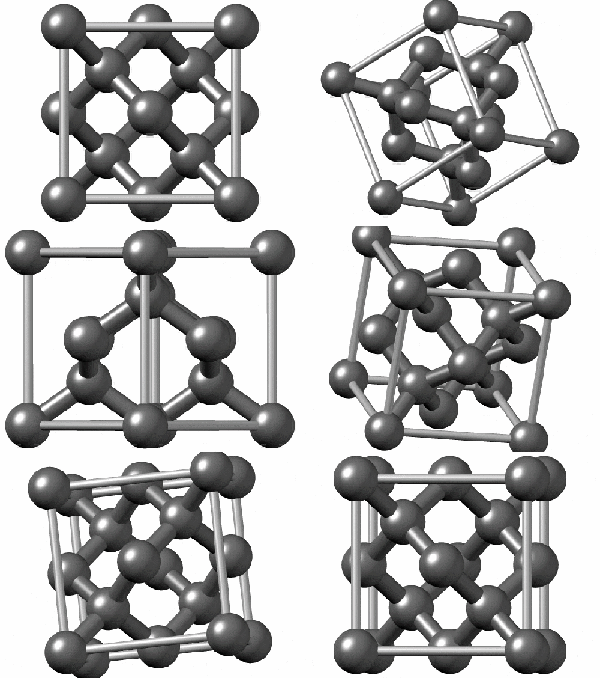
Diamond's strong because of its crystal structure (I think). What's the crystal structure look like, anyway?
Let's look at the Wikipedia page ! There's a nifty little animation:
And it SUCKS. It's TOO FAST. Why are they rotating SO MUCH SO QUICKLY, with MOST of the time spent at TERRIBLE ANGLES where you CAN'T EVEN SEE ALL THE ATOMS. And the lines are THICK, WHYYY.
It wasn't always this way. In 2017 the page had this animation:
It's not perfect but it's much better . Thinner bond lines means it's easier to see the atoms. About half the time you get a clear view of all the atoms (you want to spend some time showing how they overlap from the right angles). The camera isn't swiveling fast all the time, so you get stretches of time that view the structure from about the same angle.
Why do they use the new one? This certainly isn't the only time I've been frustrated by how fast explanatory animations move. I suspect it's because people are picking flashy animations that look cool to them, that show off how fancy they are, and there aren't enough people that actually care about understanding to stop them. Alternatively, the people that make the diagrams already understand, so they overestimate comprehensibility and thus are driven more by fanciness.
Keep the following rule of thumb in mind, and see how it corresponds to the good vs the bad animations: Every critical stage of the animation should a clear view that stays for at least 1-2 seconds .
By my count there are 4 'stages': input, the NOR op, the interchange, and the output. The creator combined the interchange and the output stage, and didn't treat the NOR stage as something worthy of a whole second.
Let's slow it down 2x, and you'll see that it'll suddenly be more comprehensible:
Let's test my theory by slowing it down 2x, so that there's a whole second between an arm getting caught on a gear (releasing the other) and the other getting caught again:
You now have time to scan your eyes over from the arm that gets caught to watch the other get released and reset itself, instead of being a little too late.
whyyyy . Seriously , was the creator on methamphetamine [2] , how could you end up going through the effort of making such a nice diagram only to mock your beautiful creation by allocating a quarter second to each stage (sliding valve is open and being pushed by the piston to the right, sliding valve closes and slides in the middle, sliding valve opens and is being pushed to the left; the original clip is .8 seconds long). What's the point of drawing the sliding valve if you aren't even going to give the viewer enough time to figure out what it does?
Much better! The clip is about 3.2 seconds long, so there's now about 1 second per cycle.
You get one second per phase, which is enough since there isn't a geometrically complicated configuration you are trying to visualize and there's only basically one "thing" happening at once (intake, compression, expansion, exhaust). You can clearly see all the parts at all times. Perhaps my only criticism is that the cams and valves should have their movements exaggerated a bit/be bigger compared to the piston, so it's easier to see what they do and how.
Here's one that's too slow for half the time:
The problem is that the drive wheel isn't doing anything interesting in the second half of the cycle. You could cut that part of the video out and just have it loop between when it goes from the left side tho the right side. Oh, and the blue part rotates for about a second, while the red part is going in and out of the blue part (before and after rotating) for about a second, which is close enough to my theory. You could get away with speeding it up 2x, but only because this mechanism is pretty simple.
Maybe I'm just slow at understanding figures. My guess, though, is that most viewers would be slower at the same level of understanding compared to me, so you should still take my advice.
Exercise to the reader: edit Wikipedia animations to be at actually reasonable speeds. You may find the following ffmpeg command useful:
ffmpeg -i input.gif -vf "setpts=2.0*PTS,fps=15,scale=480:-1:flags=lanczos,split[s0][s1];[s0]palettegen[p];[s1][p]paletteuse" -loop 0 output.gif ^ Thankfully, there's a half-speed variant on Wikimedia Commons, which I've replaced the embedded image on the page to.
正在加载评论…